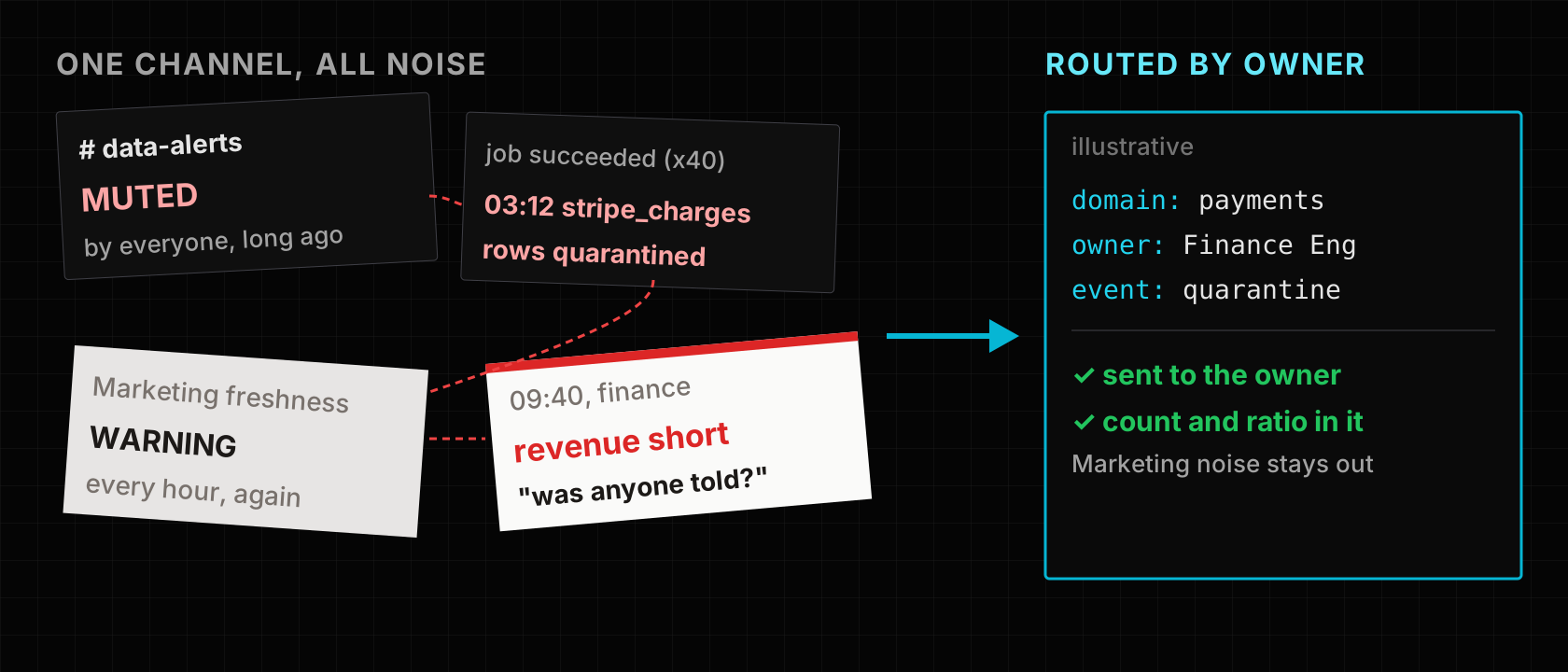
Picture someone in finance asking at 09:40 why yesterday's revenue is short. The answer was posted in #data-alerts at 03:12: the payments table silver_stripe_charges had quarantined part of its rows. It sat between a Marketing freshness warning that fires every hour and dozens of "job succeeded" messages. Everyone muted the channel long ago.
This is a common way for alerting to decay. Every job and check posts to one shared channel, the messages say what failed but not who owns it or how bad it is, and a check that keeps failing posts again on every run. Volume rises, attention falls, and turning checks off to cut the noise just creates blind spots.
The short answer: send each alert to the people who own the data, give it enough context to act on, and page once when a problem starts and once when it ends. The routing table should live with the data product, so it changes when ownership changes. This post compares the common ways to do that and shows how LakeLogic does it, including what it does not do yet.
Why alerting decays
Three habits cause it.
One channel for everyone. It is the easiest thing to set up, so it is a common starting point. The Payments on-call reads Marketing's warnings and learns to read nothing.
Alerts without context. "Job X failed" does not say which data product, which domain, which rule, how many rows or whether this is new. The reader has to open three tools to decide whether to care.
One message per evaluation. A freshness check that runs hourly on a table that stopped loading at midnight sends nine identical messages by morning. Repeats teach people that the channel is noise.
Recent job adverts for data engineers and governance leads keep asking for the same pair of things: quality controls and monitoring, and clear ownership or stewardship of data. Alert routing is where those two meet. An alert nobody owns is monitoring nobody does.
The ways teams solve it today
| Approach | How it works | Good fit | Watch out for |
|---|---|---|---|
| Platform job notifications (for example Databricks job notifications) | Email, chat, PagerDuty or webhook on job events | Knowing a job failed | Job status, not data quality |
| SQL alerts on a status or quality table | A scheduled query fires on a condition | Check results already in a table | One query per alert; owner is its author |
| Data observability tools | A vendor monitors freshness, volume and anomalies | Large estates, monitoring without writing rules | Another system; owner map kept in the tool |
| Test framework plus chat hook (dbt tests, Great Expectations) | Failures post to chat via an orchestrator callback | Tests already run in CI or orchestrator | One message per failed run, unless deduplicated |
| Incident tooling (PagerDuty, Opsgenie) | Deduplication keys, escalation, on-call schedules | Anything that should wake someone | Knows only what the sender put in the event |
Two details matter. A job that loads bad rows still succeeds, so job notifications say nothing about data quality; and Databricks allows up to three system destinations per event type, configured per job. Incident tools are excellent at routing and grouping, but only with the context the sender includes.
All of these can work, and a common combination is platform notifications for job health plus an incident tool for paging. The open question is usually where the owner mapping lives. If it is a list in the incident tool, a channel naming convention or someone's memory, it drifts when a team reorganises or a product changes hands.
How LakeLogic approaches it
In LakeLogic, each domain and its data products are described by contracts, and the domain file already declares the owner and its contacts. Alert routing reads from the same place.
Routing declared with the domain
A domain declares its owner, contacts and channels in _domain.yaml. This excerpt is from the RideFlow reference project (a fictional ride-hailing business):
# contracts/payments/_domain.yaml (excerpt)
ownership:
  domain_owner: "Finance Engineering"
  contacts:
  - name: Finance Data Lead
    role: oncall
    email: finance-data@rideflow.com
# contracts/marketplace/_domain.yaml (excerpt)
notifications:
- type: slack
  target: "#data-platform-alerts"
  on_events: [failure]
- type: email
  targets:
  - "platform-data@lakelogic.com"
  on_events: [failure, slo_breach]
Each channel lists the events it wants (failure, quarantine, schema_drift, slo_breach and a few others), so a Marketing warning does not reach the Payments channel. When LakeLogic Core runs a contract, it also turns the domain's ownership contacts into recipients for failure, SLO breach and quarantine events. Contacts declared as a Slack or Teams webhook URL receive alerts; a bare #channel name is treated as information, not a destination.
Context in the message
Core renders each alert from a template for its event type. The quarantine alert includes the run ID, engine, source path, table, domain, system and layer, plus a message with the quarantined count and ratio. You can preview the rendered text locally with the console notification type before connecting a real channel. In LakeLogic Platform, a domain channel can set its own message with whitelisted placeholders such as {{ domain }}, {{ contract }}, {{ severity }} and {{ run_id }}.
Once per problem, not once per run
LakeLogic Platform folds repeats into episodes for two kinds of alert:
- SLO breaches. A stale table pages once when the breach starts, not on every evaluation, and sends a notice when it recovers.
- Scheduled quality checks. When a rule starts failing, one notice says how many rows fail out of how many evaluated. While it keeps failing, LakeLogic updates the counts and stays quiet. When it passes again, a second notice says how long it failed. A check that produced no evidence neither opens nor closes an episode.
Scheduled-check alerts currently go to the organisation's members in-app, not to the domain's channels.
Every outcome on record
In LakeLogic Platform, every attempt to deliver to a domain channel is recorded, whether it was sent, skipped or blocked, so a missing alert can be explained rather than guessed at.
When you might not need this
- One team, a few pipelines. If the same five people own everything, one channel and platform job notifications are enough.
- You already page through an incident tool with deduplication keys and an owner map someone keeps current. Feed it, and keep the map there.
- You only care about job health. If a failed job is the only signal you act on, native job notifications cover it.
The approach pays off when many domains share a platform and ownership changes often enough that a separately kept routing table drifts.
Limits worth knowing
- Domain email in LakeLogic Platform is recorded, not sent yet. Domain-level email addresses need recipient verification first, so the Platform logs them as skipped with a reason. Slack and Teams webhooks on known hosts are sent; other webhook hosts are blocked. Core sends email itself when you run it with your own SMTP settings.
- A declared owner is not an accepted one. The contract names who should hear; it does not prove anyone is reading. Review contacts when teams change.
- Episodes cover SLO breaches and scheduled checks. Other events, such as a pipeline failure, are sent per run.
- Not an on-call system. There is no escalation or rota. For paging, send to a webhook that feeds your incident tool.
Key takeaways
- Route alerts by who owns the data, and keep that mapping with the data product so it changes with it.
- Give every alert the product, domain, rule and size of the problem, so the reader can decide without opening three tools.
- Page once when a problem starts and once when it ends; repeats are what get a channel muted.
- Separate job health from data quality: a successful job can still load bad rows.
- Make delivery itself auditable, so "nobody was told" can be checked.
Try it
The Developer Experience notebook runs a contract in Google Colab and renders its alerts to the console, so you can see what each event type contains before wiring a channel. For what happens to the rows behind a quarantine alert, read inline data quality gates.