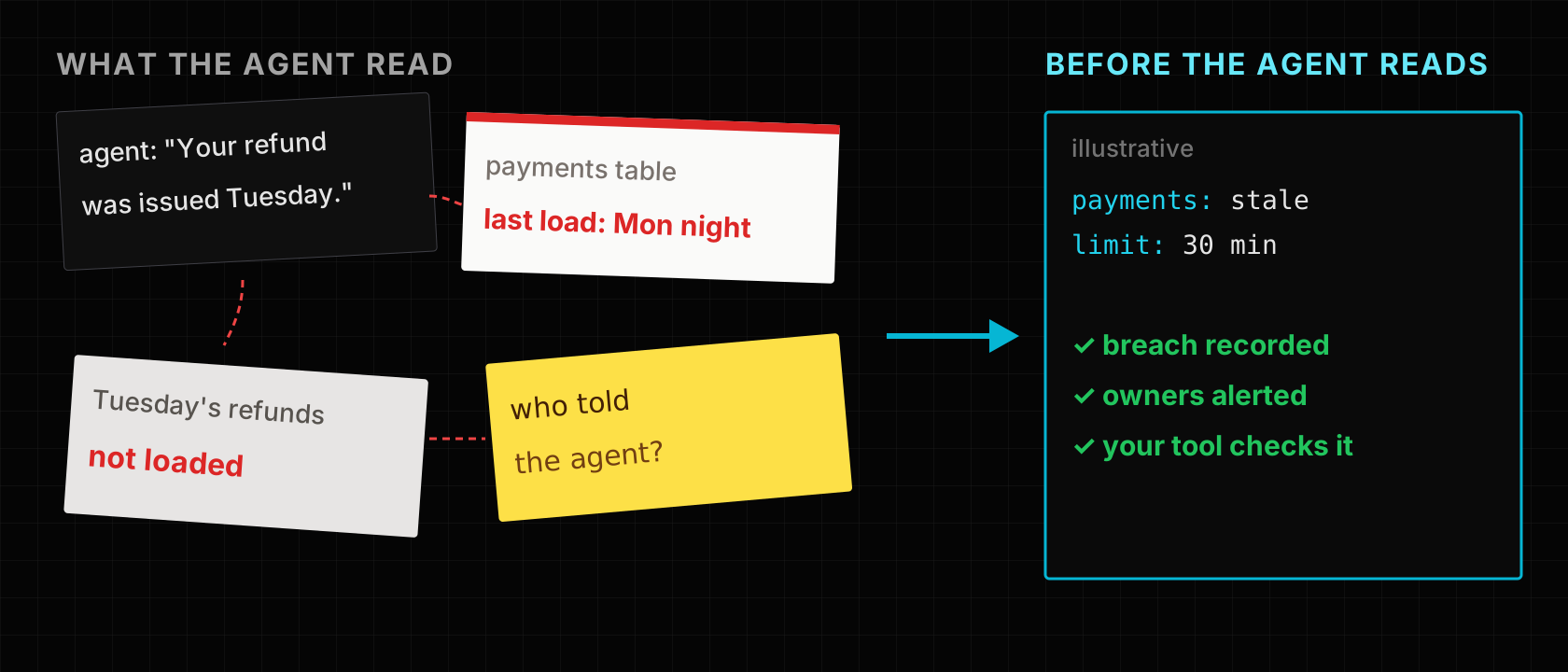
Picture a support agent telling a customer their refund was issued on Tuesday. It was not. The agent read the payments table correctly; the table had stopped loading on Monday night, and nothing told the agent, or anyone else, that it was looking at yesterday.
A common pattern is to put AI reliability work near the model: prompts, evaluations, output filters. Those cannot see that an input table is stale, half-loaded or full of rows with a missing customer ID. A model answers from what it is given, and it answers confidently.
The short answer: check the business data before an agent or retrieval index reads it, quarantine the rows that fail, and give the application a signal it can act on when the dataset as a whole is late or unhealthy. This post covers where those checks belong, the common ways to add them, and what LakeLogic contracts contribute. It does not claim data checks make AI safe; they remove one class of failure.
Why the data fails before the model does
An AI application usually sits at the end of a chain:
source systems
    -> data pipelines
    -> data products
    -> retrieval or tool call
    -> model
    -> user or automated action
Model controls act at the end of it. A broken input enters much earlier, in one of three ways:
- Structure: a required field is null, a type changed upstream, a key is duplicated.
- Meaning: a status uses an unapproved value, an amount is out of range.
- Health: the table is stale, the row count collapsed, a large share of rows failed checks.
The ways teams solve it today
| Approach | How it works | Good fit | Watch out for |
|---|---|---|---|
| Checks in the pipeline (dbt tests, Great Expectations, Soda) | Tests after a load fail the job or alert | Teams with a test framework | The agent still reads the last table version |
| Data observability tools | Monitors freshness, volume and anomalies | Broad coverage without writing every rule | Alerts people; stopping the agent is your wiring |
| Checks in the agent's tool | The tool checks a timestamp or count first | One agent, one dataset | Duplicated per tool, invisible to the data team |
| Output validation and evals | Test answers on known questions; filter outputs | Catching model errors | Rarely catches a stale but plausible input |
| Human approval for actions | A person confirms before the agent acts | High-impact actions | Slow; the reviewer may not see stale input |
A failed pipeline test usually stops the job, but the table the agent reads still holds its previous version, so the agent keeps answering from it.
All of these are worth having, and output evals and approval belong in any serious AI application. The gap is the handover: the data team knows a table is unhealthy, but the agent reading it has no signal. Closing it means the checks, the failed rows and the dataset's health are recorded where the application can read them.
How LakeLogic approaches it
A LakeLogic contract declares a dataset's schema, row rules and service levels. LakeLogic Core runs the contract in the pipeline and records what happened.
Row rules with quarantine. Rows that fail a rule go to a quarantine table with the rule they failed, and only passing rows go on. A support ticket with no customer ID or an unparseable timestamp is kept for investigation instead of reaching a retrieval index.
passing rows -----> data product the agent reads
failing rows -----> quarantine, with the failed rule
Freshness and quality service levels. A domain or contract can declare how stale data may be and what share of rows must pass:
slo:
  freshness:
    max_delay_minutes: 30
    check_columns: [processed_at]
  quality:
    min_good_ratio: 0.98
    max_quarantine_ratio: 0.02
LakeLogic checks these after a run and records a breach when the data is older than allowed or too many rows failed. Breaches can alert the domain's owners, and in LakeLogic Platform a breach pages once per episode rather than on every check.
A run record. Each run records the contract, accepted and quarantined counts, the rules that ran and the service-level results. That is what you need when someone asks which data an answer was based on.
What the application does with a breach is a product decision. It might refuse to answer, fall back to a safer source or show a warning. The contract provides the signal; the application has to read it.
When you might not need this
- The agent reads documents, not business tables. Retrieval quality and document freshness matter more than row rules.
- One small, stable dataset. A freshness check inside the tool function may be enough.
- You already run pipeline tests and the agent reads only tables that block on failure. If a failed test truly stops publication, you have the core of this.
Limits worth knowing
- Checks prove declared expectations, not truth. A row can pass every rule and still be wrong.
- LakeLogic does not stop your agent. It records failures and breaches; the agent or its tool must check them before answering.
- A quarantined subset can mislead. If half the rows fail, answering from the other half may be worse than not answering. Set a quality threshold and decide what a breach means for the application.
- LakeLogic covers the data side only. Your application must still record its own retrieval, prompt, model and response, and needs access control, PII handling, evaluation and security review. LakeLogic's run record is one part of that trail, not the whole of it.
A practical starting point
- Pick one agent that reads one important structured dataset.
- Write down the minimum data it needs for a safe answer.
- Declare the schema, the rules that matter and a freshness limit in a contract.
- Quarantine failing rows and set a quality threshold.
- Have the agent's tool check the latest run's status and breaches before answering.
- Test the agent with the data late, incomplete and blocked.
Key takeaways
- Model controls cannot see a stale or half-loaded input; check the data before the agent reads it.
- Quarantine failing rows with the reason, so they are kept for investigation instead of retrieved.
- Declare freshness and quality thresholds, and decide in advance what the application does on a breach.
- A signal only helps if the agent's tool reads it; wire the check into the tool.
- Data checks remove one class of failure; evals, access control and human approval are still needed.
Read next
Inline data quality gates shows how row rules, quarantine and dataset thresholds work in a pipeline, step by step.